
Playing online slot APKs and mobile casino apps on your Android brings plenty of excitement, but occasionally these programs stop working properly or freeze in the middle of a winning round. If you encounter unexpected app crashes, slow loading speeds, tricky installation errors, or payment delays with popular Pakistani transaction methods like EasyPaisa and JazzCash, knowing how to solve these tech troubles quickly will save you a lot of time.
This ultimate troubleshooting guide explains the main reasons why PKR mobile apps break down and provides simple, step-by-step instructions to fix every common error so you can get back to your entertainment without stress.
Why Online Casino Games Stop Working
Online earning platforms sometimes face technical issues due to weak signals or outdated software. Therefore, understanding the root cause helps you resolve the problem faster.
- Network Speed: Slow internet causes games to lag or freeze entirely.
- Browser Cache: Stored temporary data blocks fresh content from loading properly.
- Device Storage: Low memory makes applications crash suddenly during active sessions.
Do Online Slots Remember Your Winning Amount?
Digital slot machines track your active balance and game history through secure central servers rather than your personal device. When you win a prize, the system records that amount instantly in your account ledger. Therefore, if your screen disconnects right after a winning spin, the server retains your exact payout safely.
Players in Pakistan often worry that unexpected disconnections cause lost winnings, but the main database remembers every single transaction. You can always verify your past rounds by opening your profile history tab. Furthermore, automated tracking guarantees that no user loses hard-earned rewards due to brief network hiccups.
What To Do If a PKR Slot Game APK Has Frozen?
Digital matches sometimes freeze mid-spin due to browser overload or low device memory. When this happens, avoid clicking multiple buttons frantically because that action creates more lag. Instead, close your browser tab completely and open a fresh window. Alternatively, clear your temporary cache files to remove corrupted data. Once you restart the platform, the application usually restores your previous state automatically. This smart recovery mechanism protects your active session from permanent data loss.
Live Casino Problems
Real-time streaming tables require a very strong internet connection to broadcast video feeds smoothly. When your signal drops, the video stream might buffer or freeze completely. Moreover, weak Wi-Fi causes delayed bets and frustrating interruptions during live dealer sessions.
To fix the issue, switch from a slow mobile network to a stable broadband connection. Furthermore, closing heavy background applications on your device frees up internet bandwidth for better video streaming quality. Reliable connectivity ensures that you never miss a crucial moment at the virtual table.
Payment Errors and Transaction Troubles
Managing money securely on Pakistani mobile gaming apps requires correct account details and stable network signals. Sometimes, deposits or cash withdrawals get delayed due to server congestion or banking network maintenance on popular local gateways like EasyPaisa and JazzCash.
- Verify Account Details: Double-check your mobile wallet number or account ID before submitting any transfer request through local PKR mobile wallets.
- Check Local Gateways: Ensure your digital wallet service operates smoothly without temporary server outages on either EasyPaisa or JazzCash networks.
- Contact Support: Reach out to customer service agents inside your PK casino app with your EasyPaisa or JazzCash transaction receipt if funds do not reflect within standard time frames.
APK Downloading and Installation Errors
Downloading real money APK files directly from the internet can occasionally trigger security warnings or installation blocks on your Android device.
- Enable Unknown Sources: Adjust your device settings to allow installations from trusted web browsers.
- Check Storage Space: Clear unwanted files to make enough room for the setup package.
- Download Official Files: Always grab installation packages from verified pages to avoid corrupted data.
Cash Game Account Creation and Registration Hurdles
Setting up a fresh profile sometimes stops unexpectedly if specific data fields contain errors or duplicate numbers.
- Unique Credentials: Use an active sim number that has never registered on the platform before.
- Strong Passwords: Create secure login keys containing letters and numbers to meet platform security rules.
- Verify OTP Codes: Wait patiently for the confirmation text message before refreshing the submission form.
Password Recovery and Login Problems
Losing your secret access key locks you out of your gaming dashboard instantly.
- Use Recovery Options: Tap the forgot password button on the main login screen to receive a reset link.
- Check Spam Folders: Look inside your email junk folder if the reset code does not arrive in your primary inbox.
- Contact Assistance: Ask platform administrators to verify your identity manually if automated recovery fails.
How to Recover Your PKR Cash Gaming Account in 2026
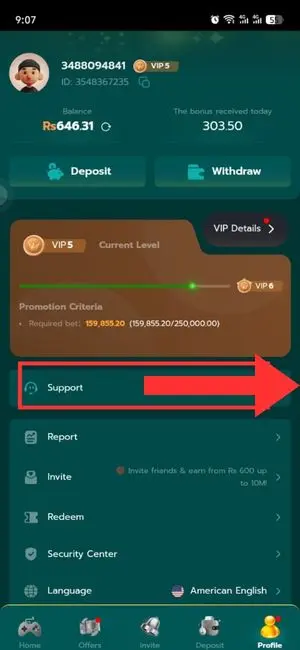

Regaining access to your locked wallet or profile requires following official recovery protocols. When forgotten credentials prevent you from entering your dashboard, taking systematic steps restores your account safely.
- Submit Valid Identification: Provide correct personal details or registered phone numbers to prove your ownership.
- Reset Security PIN: Follow the verification prompts sent via SMS to create a brand new password.
- Contact Live Chat Helpers: Speak directly with customer support agents if automated system recovery tools encounter errors. For instance, most popular platforms like the 1PPP app feature built-in customer support sections right inside the application where you can chat with live helpers instantly to resolve login problems.
Multiple Device Login Conflicts
Accessing your profile from two different gadgets simultaneously often triggers security blocks. Moreover, you must avoid running multiple accounts on a single phone because gaming platforms like HQ177 enforce strict single-device policies that permanently ban profiles if users log into two separate accounts on the same mobile.
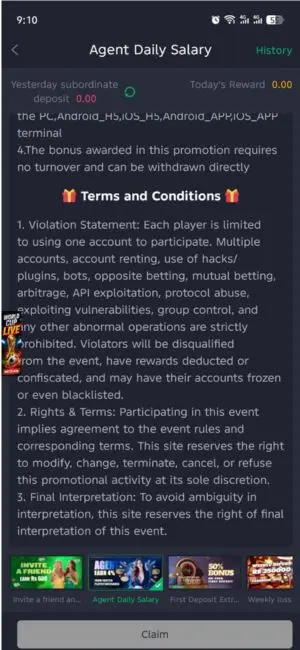
- Log Out Securely: Sign out from your previous phone or computer before opening your account elsewhere.
- Single Session Rule: Most platforms permit only one active connection per user profile to protect funds and stop rule violations.
- Clear Active Tokens: Restart your application to refresh session data if your login freezes unexpectedly.
How to Scan Apps and Detect Virus Applications on Your Phone
Scanning mobile applications and identifying harmful software protects your device from digital security threats. When your Android device acts strangely or drains battery fast, a malicious file might be running secretly in the background. Therefore, knowing how to inspect files and spot dangerous programs keeps your personal data safe.
- Use Built-in Security: Open your phone settings and run the default device scanner to inspect installed software.
- Install Trusted Antivirus: Download a reputable security tool from the official app store to perform deep system scans.
- Check Permissions: Review what device features each application accesses, such as your camera or contacts list.
How to Recognize a Virus or Fake Apps
Malicious programs often display unusual warning signs that expose their harmful nature. Spotting these red flags helps you delete dangerous files immediately.
- Battery Drain: The phone heats up quickly and loses power even when you are not using it.
- Strange Pop-ups: Random advertisements appear on your home screen or browser without your permission.
- Unknown Data Usage: The application consumes heavy internet data quietly in the background.
- Missing Developer Info: Fake software often lacks clear creator details or official company pages.
Steps to Remove Dangerous Apps Safely
Once you identify a harmful program, getting rid of it stops further damage to your mobile device.
- Disconnect Internet: Turn off your Wi-Fi and mobile data immediately to block the app from sending data out.
- Enter Safe Mode: Restart your phone in safe mode to prevent malicious background services from running.
- Uninstall the File: Go to your application manager settings, select the suspicious program, and tap remove.
- Clear Storage Cache: Delete remaining temporary folders to ensure no corrupted files stay behind.
Common Bug Types
Online platforms frequently experience specific technical errors that disturb regular sessions. Recognizing these bugs helps you apply the right solution fast.
- Loading Errors: The page stays blank because temporary files block fresh content from appearing.
- Lag Issues: Animations move slowly due to weak internet signals or overloaded device processors.
- Sudden Crashes: Applications close by themselves because your phone lacks free memory storage.
Ideas for Fixing These Problems
Resolving technical errors quickly lets you return to your entertainment without extra stress. Follow these simple troubleshooting steps to restore normal performance:
- Restart Your Device: Turning your phone or computer off and on clears out temporary software bugs.
- Update Your App: Installing the newest software version ensures full compatibility with modern gaming features.
- Clear Browser Data: Deleting old cache files prevents lagging pages and loading failures.
- Check Signal Strength: Moving closer to your Wi-Fi router provides a steady connection for uninterrupted play.
Smart Tips for Smooth Gaming in Pakistan
Enjoying digital entertainment safely requires a calm mind and a secure setup. Follow these handy rules to keep your experience fun and trouble-free.
- Close Background Apps: Shut down unused programs to give your phone or computer more speed.
- Keep Devices Updated: Regular system updates protect your gadget from software conflicts.
- Use Official Links: Always access trusted platforms to avoid broken pages and security risks.
Conclusion
Resolving digital real PKR gaming errors is simple when you know the correct steps. By checking your internet, clearing cache files, securing your login details, recovering lost profiles, scanning for malicious software, and avoiding fake apps, you ensure a smooth session every time. Stay calm, follow these easy rules, and enjoy your entertainment safely.